

Kashida Paint Visualizer
Visualize Colors. Transform Spaces.
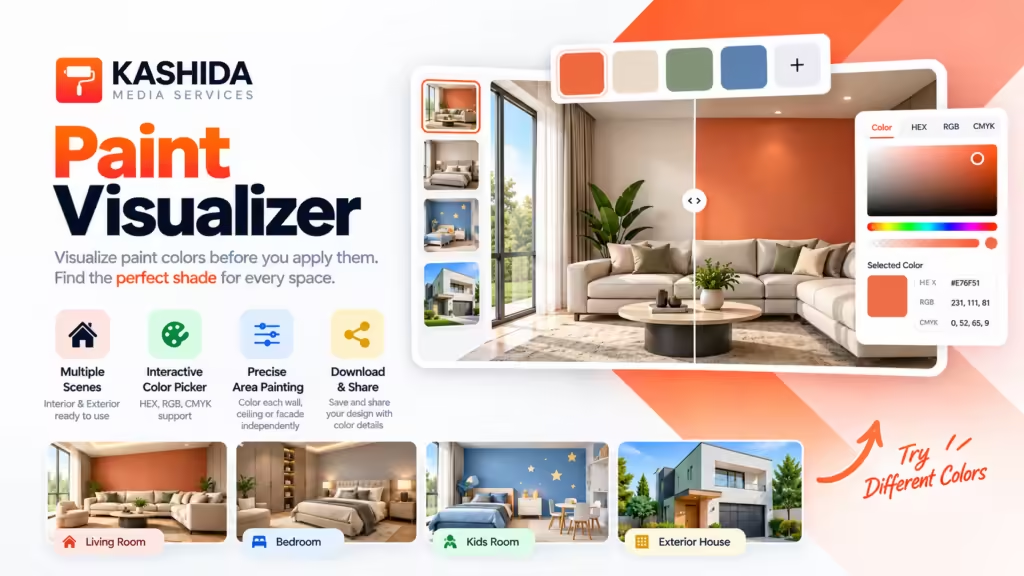
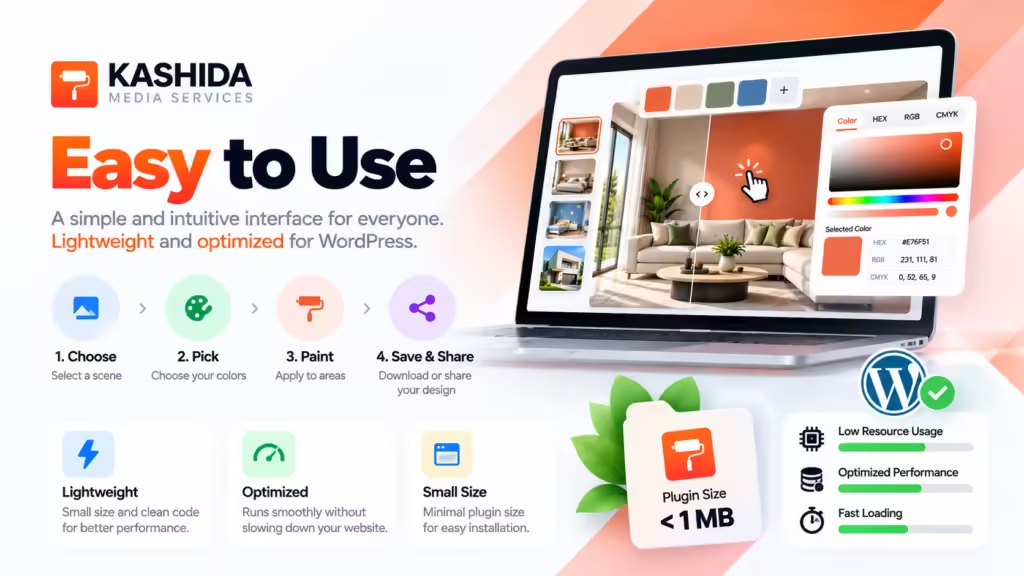
Kashida Paint Visualizer is a lightweight, interactive WordPress plugin that helps visitors explore paint colors and preview how different shades look on interior walls, ceilings, and exterior facades before making a final decision.
With an intuitive interface, flexible color selection tools, and precise paintable regions, users can experiment with color combinations, compare ideas, and create personalized designs directly on your website.
PLUGIN DETAILS
- Version: v2.6.14
- Last Updated: 10-2026
- WordPress Version: v6.0+
- PHP Version: v8.0
- Languages: English, Arabic
- Plugin Type: Request a quote
Key Features
- Four Realistic Scenes: Explore the Living Room, Bedroom, Kids Room, and Exterior House.
- Precise Color Application: Apply different colors independently to specific walls, ceilings, and exterior facade sections.
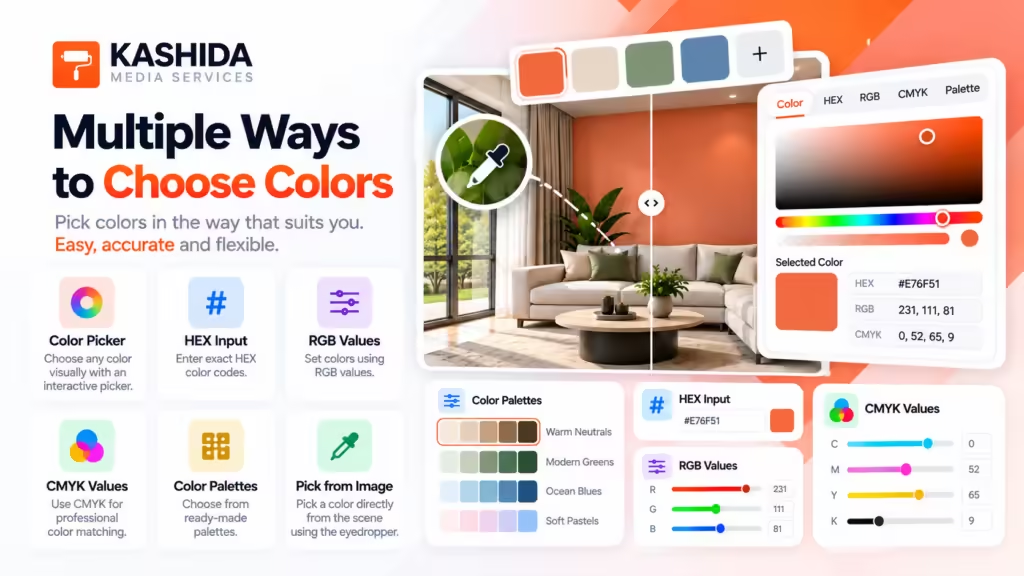
- Flexible Color Selection: Choose colors using the interactive color picker or enter exact HEX, RGB, and CMYK values.
- Multiple Color Combinations: Experiment with several shades across different areas of the same scene.
- Live Visual Preview: See your selected colors applied directly to the scene.
- Undo & Redo: Easily reverse or restore your color adjustments.
- Reset Controls: Restore the original scene or reset all changes.
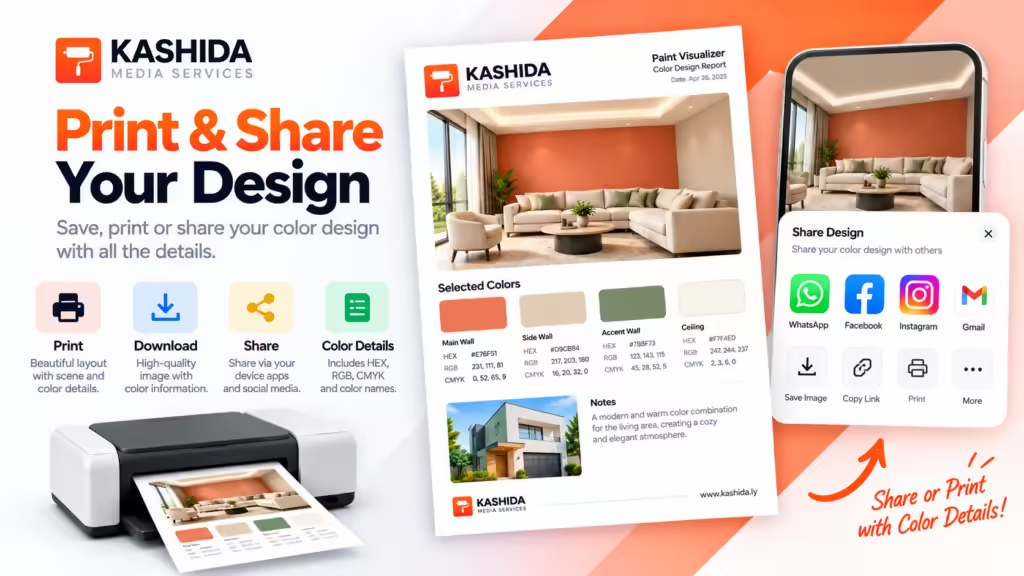
- Download Your Design: Export the finished visualization with the applied colors and their color values.
- Share Your Design: Share your finished image and color details using supported device and browser sharing options.
- Responsive Interface: Enjoy a convenient experience across desktop, tablet, and mobile devices.
- Translation Ready: Includes Arabic localization and supports additional languages through standard WordPress translation files.
- Privacy-Friendly: Designs do not need to be stored in the WordPress database.
Designed for Paint & Interior Design Businesses
Kashida Paint Visualizer is ideal for paint manufacturers, distributors, building material retailers, interior designers, architects, and real estate websites looking to offer visitors a more engaging way to explore paint colors.
Help your customers visualize their ideas, experiment with color combinations, and make more confident color choices—all directly on your WordPress website.
Installation Guide (Easy to Integrate)
- Log in to your WordPress dashboard.
- Navigate to Plugins → Add New Plugin.
- Search for Kashida Video Embed, or download the plugin ZIP file from WordPress.org.
- If you downloaded the ZIP file, select Upload Plugin, choose the file, and click Install Now.
- Click Activate after installation.
- Open the page or post where you want to display your video collection.
- Add the plugin’s shortcode to the desired location and configure the display options.
- Preview the page and have fun 😉
Frequently Asked Questions (FAQ)
1. What is Kashida Paint Visualizer?
Kashida Paint Visualizer is a commercial WordPress plugin that allows website visitors to explore paint colors and preview them on interior rooms and exterior house facades. It helps customers visualize color combinations before making their paint selections.
2. Is Kashida Paint Visualizer free?
No. Kashida Paint Visualizer is a paid plugin available upon request for a quotation. Please contact Kashida Media Services for pricing and licensing information.
3. How can I request a quotation?
Contact Kashida Media Services through kashida.ly to discuss your requirements and request a price quotation.
4. Which scenes are included?
The visualizer includes four scenes: Living Room, Bedroom, Kids Room, and Exterior House.
5. Can I apply different colors to individual walls?
Yes. You can select specific walls, ceilings, and exterior facade sections and apply different colors to each paintable region independently.
6. How can I select a color?
You can choose a color using the interactive color picker or enter its values directly in HEX, RGB, or CMYK format.
7. Can I apply multiple colors to one scene?
Yes. You can apply different colors to multiple regions within the same scene to experiment with color combinations and create personalized designs.
8. Can I undo or reset my changes?
Yes. The plugin includes Undo and Redo controls, an option to reset the current scene, and a control to reset all changes.
9. Can I download my finished design?
Yes. You can download the final visualization as an image showing the selected scene with the applied colors and their corresponding color values.
10. Can I share my design?
Yes. You can share your finished image and color details using the sharing options supported by your device and browser. Direct image sharing availability depends on the selected application and platform.
11. Are user designs stored in the WordPress database?
No. The plugin is designed to let users create, download, and share their designs without storing them in the WordPress database.
12. Is the plugin compatible with mobile devices?
The interface is designed to work across desktop computers, tablets, and smartphones. Some features, particularly image sharing, may vary depending on the browser and device.
13. Does the plugin support Arabic and other languages?
Yes. The plugin includes Arabic translation files and supports additional languages through standard WordPress translation files.
14. How do I add the visualizer to my WordPress website?
After obtaining and installing the plugin, activate it and add the following shortcode to the page where you want the visualizer to appear:
15. Can the plugin be customized for my business?
Customization requirements can be discussed with Kashida Media Services. Contact us to explore the available options and request a quotation tailored to your needs.
16. Who is behind Kashida Paint Visualizer?
Kashida Paint Visualizer is designed and developed by Kashida
Website: https://kashida.ly
17. How can I get more information?
For product inquiries, pricing, licensing, or customization requests, visit Kashida Media Services and contact our team.
Changelog
Version 2.6.14
- Improved the paint visualization experience.
- Refined the user interface and interaction controls.
- Improved compatibility with WordPress themes.
- Enhanced overall usability and performance.
Version 2.6.13
- Bug fixes and stability improvements.
Version 2.6.12
- Minor interface improvements and refinements.
Version 1.3.1
- Updated typography to inherit the active WordPress theme’s font.
- Improved the design-sharing experience with a dedicated sharing dialog.
- Added sharing options for supported applications and devices.
- Included applied color details in the design-sharing text.
- Retained image download as a separate option.
Version 1.3.0
- Added the Kashida Media Services footer with a logo and website link.
- Added Arabic translation files.
- Added a POT template for translating the plugin into additional languages.
- Updated plugin metadata and documentation.
Version 1.2.0
- Improved paint-mask accuracy across all four scenes.
- Added dedicated paintable regions for walls, ceilings, and exterior facade sections.
Version 1.1.0
- Added a free-form color picker.
- Improved the visualizer layout.
- Added image sharing using supported browser capabilities.
- Improved color selection and application controls.
Version 1.0.0
- Initial release.
- Introduced four paint visualization scenes: Living Room, Bedroom, Kids Room, and Exterior House.
- Added region-based color application.
- Added HEX, RGB, and CMYK color input.
- Added image download and basic sharing functionality.
Plugin Information
- Plugin Name: Kashida Paint Visualizer
- Version: v2.6.14
- Developer: Kashida Media Services
- Website: https://kashida.ly
- Short Description: An interactive paint visualizer that lets users preview paint colors on room interiors and house exteriors.
- License: Commercial — Request a quotation.
- Supported Languages: English, Arabic, and translation-ready for additional languages.
Main Features:
- Four visualization scenes: Living Room, Bedroom, Kids Room, and Exterior House.
- Apply colors to designated paintable areas.
- Enter colors using HEX, RGB, or CMYK values.
- Undo, redo, and reset color changes.
- Download and share visualizations.
- Inherit typography from the active WordPress theme.
- Responsive interface with Arabic translation support.